Issue a Regulated Stablecoin
Build a GENIUS-compliant digital dollar on Solana with institutional custody, integrated compliance, and operational reversibility from day one.
This tutorial walks you through issuing a regulated stablecoin on Solana. The product you ship at the end is one that a Federal Reserve examiner could read and a bank's compliance committee could sign against. Issuing one is not the same as deploying a token. It requires institutional custody, integrated compliance, and operational reversibility from day one. The GENIUS Act treats those capabilities as preconditions, not features.
1. What this work demands
1. Custody is not your laptop. A regulated stablecoin is held by a federally chartered custodian. For a US issuer operating under the GENIUS Act framework, that usually means Anchorage Digital Bank or an equivalent federally chartered crypto bank. The custodian holds the signing keys for the mint, freeze, and permanent-delegate authorities. Not the engineer at the issuer.
2. Compliance is integrated from day one. Every transfer destination gets screened before the transfer is built. Every frozen account ties back to a court order, sanctions notice, or internal compliance ticket. The integration is not bolted on later; it sits on the same API surface as the mint and burn endpoints.
3. Operational reversibility is the product, not a failure mode. Freeze, seize, and force-burn are the technological capabilities the GENIUS Act requires you to have ready before launch. They exist in the SDP API because the regulation says they must, and your compliance officer will check for them. Section 5 covers each in detail.
4. The reader is institutional. This tutorial assumes you are a developer at a financial institution or fintech, building under a compliance officer's oversight. The decisions you make are decisions she will see in product review. Section 2 walks through the prerequisites in that light.
Every code sample in this tutorial was exercised against SDP's sandbox during writing; the request and response shapes shown here are what the live API actually returned.
2. Prerequisites
You need an SDP account, a custody provider, two project-scoped API keys (one for routine operations, one for compliance operations), and a funded devnet wallet. About thirty minutes end-to-end if you have nothing today.
1. Account and organization
Sign up at platform.solana.com using email, Google, or GitHub. Create your organization when the dashboard prompts you. SDP provisions a matching organization on its side via a Clerk webhook; the dashboard's onboarding cards clear once the sync lands.
2. Custody provider
An institutional issuer in the US pipeline configures Anchorage Digital Bank as the custodian. The Anchorage onboarding team provisions the signing wallets and binds them to your SDP organization. If you're working on the self-serve sandbox without an Anchorage relationship yet, SDP auto-provisions Privy wallets for development access instead. The API surface is identical; only the wallet record's provider field differs.
3. API keys: the two-key institutional pattern
The hardest cliff in setup is that the dashboard's "Create API key" dialog only mints org-scoped keys. The issuance API requires project-scoped keys. Project management in the dashboard is on the SDP roadmap; until it lands, the workaround is a short sequence of API calls.
The bootstrap path:
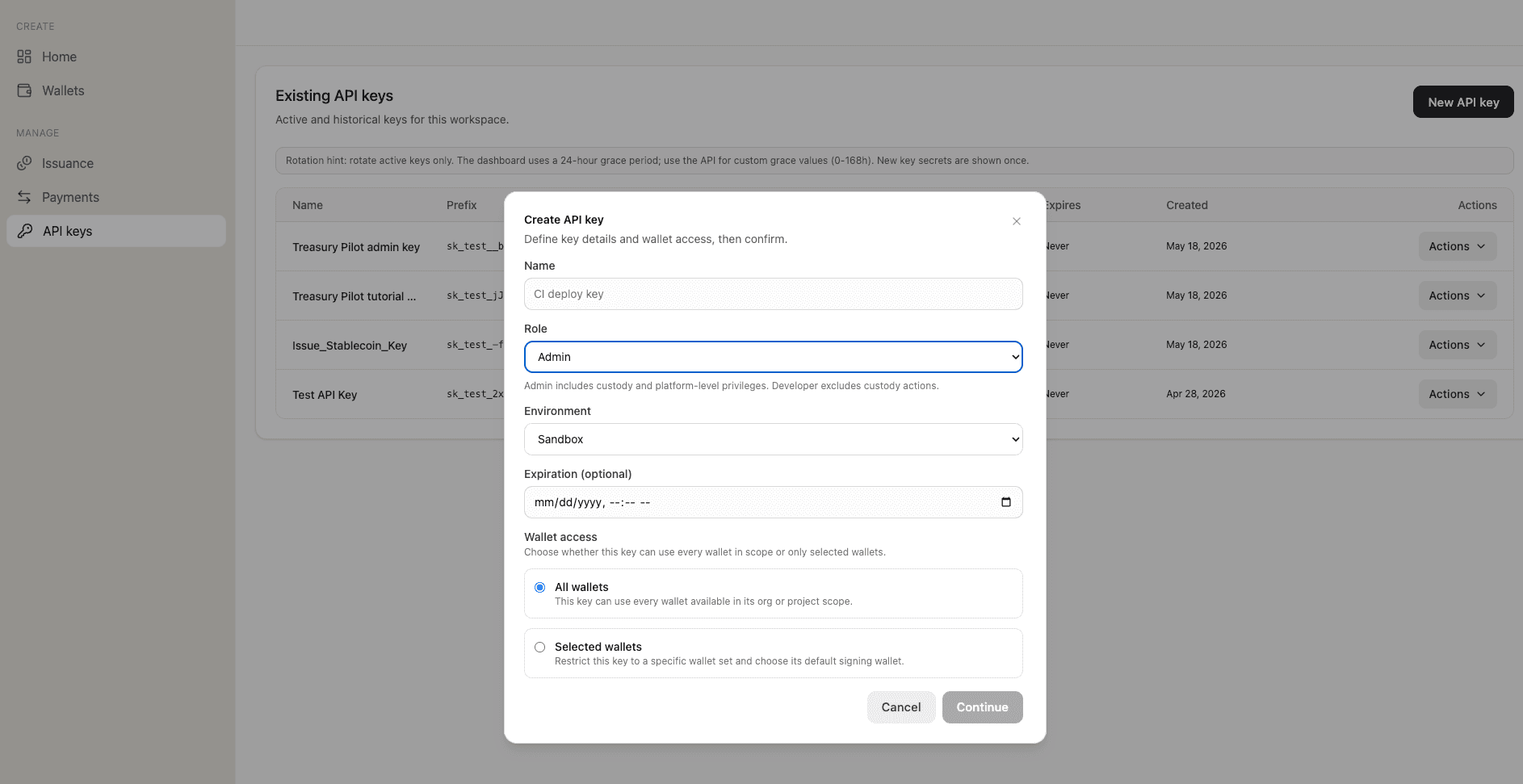
From the dashboard, mint an org-scoped API key with Role: Admin, Environment: Sandbox. This is your bootstrap credential.
With the Admin key, call GET /v1/projects and pick the project with slug default-sandbox. Every organization is provisioned with exactly one sandbox and one production project automatically — isolation between workloads comes from separate organizations, not additional projects. The project ID is what you'll need in the next step:
{
  "data": {
    "projects": [
      {
        "id": "prj_3bc13bcb-...",
        "slug": "default-sandbox",
        "environment": "sandbox",
        "status": "active"
      },
      {
        "id": "prj_8a201d47-...",
        "slug": "default-production",
        "environment": "production",
        "status": "active"
      }
    ]
  }
}
Call POST /v1/projects/{projectId}/api-keys twice to mint two project-scoped keys: one with role: "api_developer" for routine create, mint, and burn calls, and one with role: "api_admin" for compliance operations (screening, freeze, seize, force-burn). Each response includes the full key value exactly once:
{
  "data": {
    "apiKey": {
      "id": "key_375fe1e1-...",
      "keyPrefix": "sk_test__b3",
      "key": "sk_test_<full key, shown once>",
      "role": "api_developer",
      "environment": "sandbox"
    }
  }
}
The key field appears only on this response. Capture it into your secrets manager immediately; SDP does not surface it again.
Store the two project-scoped keys with your other production secrets. Keep the org-scoped Admin key cold; you only touch it when you provision additional keys or rotate.
4. Sandbox readers: fund your custody wallet
On devnet, the custody wallet starts at zero lamports, which means SDP cannot pay transaction fees from it. Fund it via the browser faucet:
The browser faucet is more reliable than the RPC requestAirdrop method, which is heavily rate-limited. Production readers operating under Anchorage do not handle this step manually; the bank funds the custody address as part of its standard operational support.
5. API base URL
The canonical SDP API URL is https://api.solana.com. Use this hostname for every production request.
6. Wire up your client and verify
Wire two HTTP clients (one per project-scoped key) using a thin wrapper around fetch:
const BASE = "https://api.solana.com";

class SdpClient {
  constructor(apiKey, baseUrl = BASE) {
    this.apiKey = apiKey;
    this.baseUrl = baseUrl;
  }

  async request(method, path, body) {
    const res = await fetch(`${this.baseUrl}${path}`, {
      method,
      headers: {
        Authorization: `Bearer ${this.apiKey}`,
        "Content-Type": "application/json",
      },
      body: body ? JSON.stringify(body) : undefined,
    });
    const payload = await res.json();
    if (!res.ok) throw new Error(`${payload.error.code}: ${payload.error.message}`);
    return payload;
  }

  get(path) { return this.request("GET", path); }
  post(path, body) { return this.request("POST", path, body); }
}

const sdp = new SdpClient(process.env.SDP_API_KEY);
const sdpAdmin = new SdpClient(process.env.SDP_ADMIN_API_KEY);
Use sdp for routine operations (create, mint, burn) and sdpAdmin for compliance operations (screening, freeze, seize, force-burn). Section 4 extends this client with Idempotency-Key header support when state-mutating execute endpoints come into play.
Now confirm the setup by listing the wallets bound to your project:
const { data } = await sdp.get("/v1/wallets");
const custodyWallet = data.wallets.find(
  (wallet) => wallet.status === "active" && wallet.isRuntimeExecutionAllowed
);
if (!custodyWallet) throw new Error("No active custody wallet can execute");

const signingCustodyWalletId = custodyWallet.id;
const custodyAddress = custodyWallet.publicKey;
console.log(`Custody wallets configured: ${data.wallets.length}`);
console.log(`Deployment wallet: ${signingCustodyWalletId}`);
A working setup prints:
Custody wallets configured: 2
Deployment wallet: cwlt_123
If the response includes an active wallet with isRuntimeExecutionAllowed: true, your custody is bound and you are ready to deploy a token. If it returns no wallets, your custody provider has not finished provisioning. For the Anchorage pipeline, contact your onboarding lead. For the self-serve sandbox, wait a minute and re-run; Privy's initial wallet provision can lag the SDP organization creation by a few seconds.
Keep both values. signingCustodyWalletId is the exact SDP Wallet record id (cwlt_*) used by issuance requests. It is not the provider-specific walletId or the Solana publicKey; custodyAddress is that public key and is used only where an on-chain address is required.
3. Design the token
Before any API call, you decide three things: which template to start from, what compliance posture the token deploys with, and which authorities the custodian holds. The design is what your compliance officer reviews. The API calls in Section 4 are the mechanical follow-through.
1. Pick the template
SDP ships three public Tokenization Templates, each prescribing a fixed set of Token-2022 extensions tuned to an institutional product shape:
stablecoin. 6 decimals by default. Required extensions:permanentDelegateandpausable. Token Access Control allowlist off. The right template for a regulated dollar.tokenized-security. 8 decimals. Required extensions:permanentDelegate,pausable, andscaledUiAmount. Token Access Control allowlist on; accounts open frozen. The right template for a regulated security.custom. 9 decimals. No required extensions. Use only when neither template above fits.
This tutorial uses stablecoin. The required extensions are what a US permitted payment stablecoin issuer needs to satisfy the GENIUS Act's technological-capability mandate covered in Section 5.
2. Set the compliance posture
Four boolean flags on token creation determine the posture you deploy with:
isFreezable. Set totrue. Iffalseat create time, the token deploys with no freeze authority and freezing becomes impossible afterward.isMintable. Set totruefor an active stablecoin. You will mint as new fiat reserves arrive at the custody bank.requiresAllowlist. Turns on Token Access Control's allowlist mode — only listed addresses may receive the token. Leave off for a payment stablecoin: the institutional pattern is screen-before-transfer, not gate-by-allowlist. Thetokenized-securitytemplate flips this on automatically.maxSupply. Optional cap in UI units (decimal string). Useful for pilot programs with a hard ceiling. Omit for uncapped supply.
3. Plan the authorities
A regulated stablecoin has four on-chain authorities, each a distinct role on the mint. At deploy, SDP wires all four to your custody signer by default:
mint. Authorizes new supply.freeze. Freezes and unfreezes individual token accounts.permanentDelegate. Moves or burns any holder's tokens without their signature. The technological capability the GENIUS Act requires for lawful orders.metadata. Updates on-chain token metadata.
A fifth, the pause authority, lives on the pausable extension configuration. SDP defaults it to the mint authority if you don't set it explicitly.
You can delegate or revoke any of these later via POST /v1/issuance/tokens/{id}/authority. Default-everything-to-custody is the institutional baseline.
4. Capture the design as a config
Section 4 takes one input: the configuration object representing the design choices above. For the Treasury Pilot USD example this tutorial uses end-to-end:
const tokenConfig = {
  template: "stablecoin",
  name: "Treasury Pilot USD",
  symbol: "TPUSD",
  decimals: 6,
  signingCustodyWalletId,
  description: "GENIUS-compliant treasury pilot stablecoin.",
  maxSupply: "100000000",
  isFreezable: true,
  isMintable: true,
};
With your design captured, you're ready to make the first state-mutating call.
4. Create and deploy
Two API calls take a design from object literal to a deployed regulated stablecoin on Solana: one to create the record, one to deploy on-chain. Both run from the Developer key (sdp).
1. Extend the client for Idempotency-Key
Every state-mutating execute endpoint in SDP (deploy, mint, burn, seize, force-burn, authority) supports an Idempotency-Key HTTP header. A retry with the same key replays the original response. A retry with a different key is a new request. The header is how you make network-level retries safe under partial failure. Replace the SdpClient definition from Section 2 with this version:
class SdpClient {
  constructor(apiKey, baseUrl = BASE) {
    this.apiKey = apiKey;
    this.baseUrl = baseUrl;
  }

  async request(method, path, body, { idempotencyKey } = {}) {
    const headers = {
      Authorization: `Bearer ${this.apiKey}`,
      "Content-Type": "application/json",
    };
    if (idempotencyKey) headers["Idempotency-Key"] = idempotencyKey;

    const res = await fetch(`${this.baseUrl}${path}`, {
      method,
      headers,
      body: body ? JSON.stringify(body) : undefined,
    });
    const payload = await res.json();
    if (!res.ok) throw new Error(`${payload.error.code}: ${payload.error.message}`);
    return payload;
  }

  get(path) { return this.request("GET", path); }
  post(path, body, opts) { return this.request("POST", path, body, opts); }
}

const sdp = new SdpClient(process.env.SDP_API_KEY);
const sdpAdmin = new SdpClient(process.env.SDP_ADMIN_API_KEY);
const idempotencyKey = (op) => `${op}-${crypto.randomUUID()}`;
Generate one key per logical operation, not per retry. Create the key once before the first attempt, store it in a variable, and reuse that same value for every retry of the same call.
2. Create the token record
The first call writes the token's metadata to SDP's database. Nothing happens on Solana yet. The token starts in status: "pending" with no mintAddress:
const created = await sdp.post("/v1/issuance/tokens", tokenConfig);
const tokenId = created.data.token.id;
A successful response:
{
  "data": {
    "token": {
      "id": "tok_e152fd38-...",
      "template": "stablecoin",
      "symbol": "TPUSD",
      "decimals": 6,
      "status": "pending",
      "signingCustodyWalletId": "cwlt_123",
      "mintAddress": null,
      "isFreezable": true,
      "isMintable": true,
      "requiresAllowlist": false,
      "maxSupply": "100000000"
    }
  }
}
Save the tok_* ID; the deploy call uses it.
3. Deploy on-chain
The deploy call submits a Token-2022 mint creation transaction to Solana via the custody signer, and updates the token record with the resulting on-chain addresses:
const deployKey = idempotencyKey("deploy");
const deployed = await sdp.post(
  `/v1/issuance/tokens/${tokenId}/deploy`,
  { signingCustodyWalletId },
  { idempotencyKey: deployKey }
);
const mintAddress = deployed.data.token.mintAddress;
A successful response carries the deployed token record with status: "active" and the on-chain mintAddress populated:
{
  "data": {
    "token": {
      "id": "tok_e152fd38-...",
      "status": "active",
      "signingCustodyWalletId": "cwlt_123",
      "mintAddress": "6V5bTuMsmXyhdY2Hj6VWQZsuacugACBmPqNtQgGtar8L",
      "mintAuthority": "ASy986dzvVqHHV2Ftfe9ZKshKZhEEQwuAoPoKMc64A9X",
      "freezeAuthority": "ASy986dzvVqHHV2Ftfe9ZKshKZhEEQwuAoPoKMc64A9X",
      "metadataAuthority": "ASy986dzvVqHHV2Ftfe9ZKshKZhEEQwuAoPoKMc64A9X",
      "extensions": {
        "defaultAccountState": "initialized",
        "permanentDelegate": "ASy986dzvVqHHV2Ftfe9ZKshKZhEEQwuAoPoKMc64A9X"
      },
      "deployedAt": "2026-05-18T14:50:43.329Z"
    }
  }
}
The mintAuthority, freezeAuthority, and metadataAuthority all resolve to the public key of the exact signingCustodyWalletId supplied above. The permanentDelegate is set at the same time and appears on the token record's extensions.permanentDelegate field rather than as a top-level authority. After deployment, the token's signingCustodyWalletId is historical attribution, not a preferred signer or fallback; authority-gated operations are checked against their live on-chain authority, and a standard burn uses its exact source wallet.
Deploy can return a bare 500 INTERNAL_ERROR with no details field. The most common cause on devnet is an unfunded custody wallet (Section 2 covered the airdrop fix), but any downstream Solana RPC failure surfaces this way. Fund the custody wallet via the faucet and re-run /deploy with the same Idempotency-Key to replay, or a fresh key for a new attempt. SDP treats different keys as different requests; the same key with the same params replays the prior result.
4. Confirm the deploy
Before moving to Section 5, confirm the on-chain state matches the record:
const { data } = await sdp.get(`/v1/issuance/tokens/${tokenId}`);
console.log(`Status: ${data.token.status}`);
console.log(`Mint:   ${data.token.mintAddress}`);
A working deploy prints:
Status: active
Mint:   6V5bTuMsmXyhdY2Hj6VWQZsuacugACBmPqNtQgGtar8L
The same state surfaces in the SDP dashboard's issuance view:
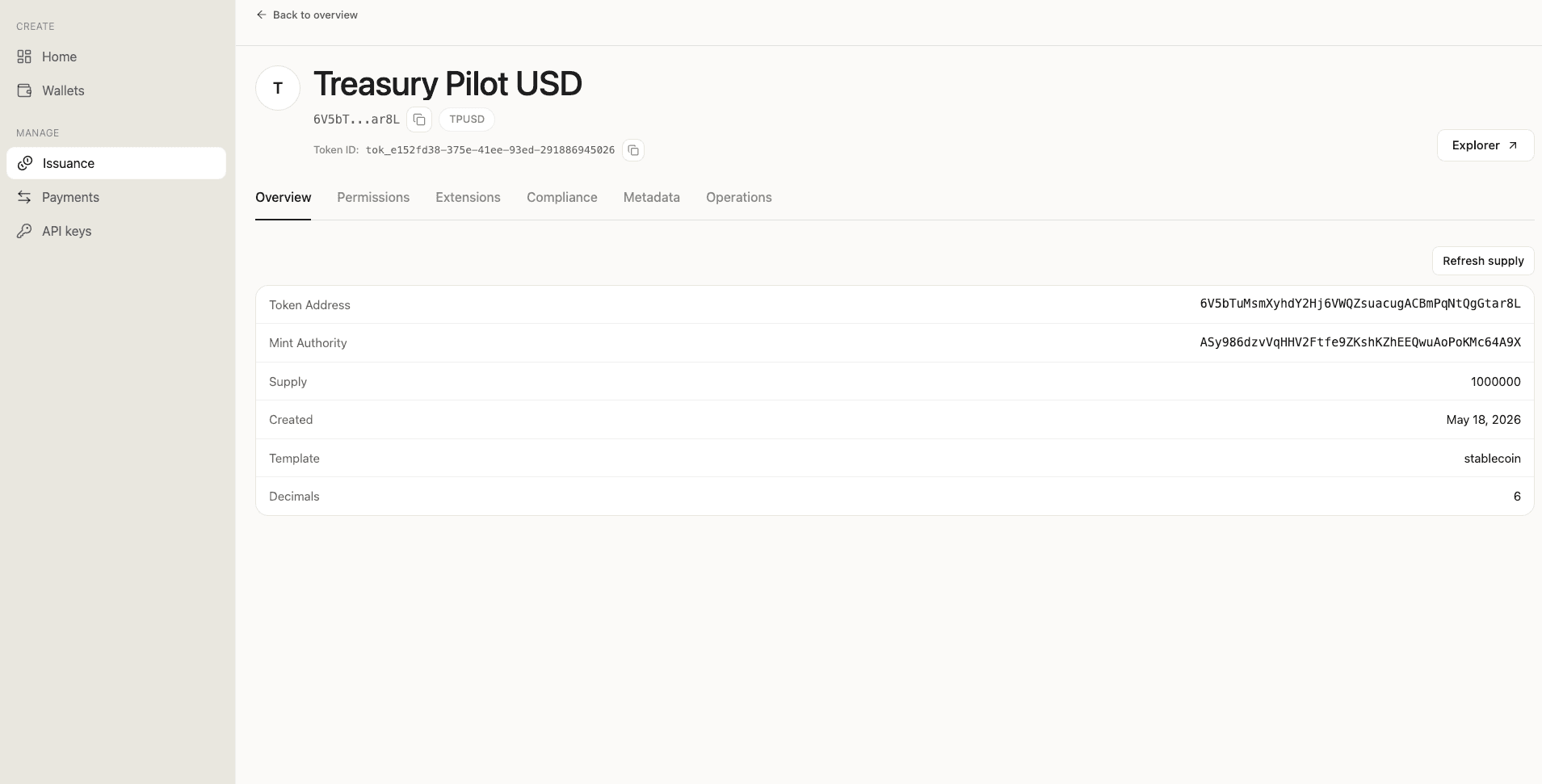
With the token deployed, Section 5 configures the compliance controls the GENIUS Act requires before any tokens move.
5. Configure compliance controls
Every other section of this tutorial is engineering. This one is the regulatory backbone.
Section 4(a)(5) of the GENIUS Act treats a permitted payment stablecoin issuer as a financial institution for purposes of the Bank Secrecy Act. That single sentence is what makes everything below load-bearing. The Act also requires you to have "the technological capability to comply with all lawful orders to seize, freeze, burn or prevent the transfer of outstanding stablecoins." The endpoints in this section map directly onto that statutory phrase, in the order you'll encounter them: screening first, freeze for per-account blocks, seize for compliance recovery, force-burn as the final remedy.
The issuance selectors below reuse the exact signingCustodyWalletId from Section 2. SDP verifies that it controls the live freeze or permanent-delegate authority before signing.
Screen before you move
Every transfer destination and every allowlist entry gets screened before your application acts on it. One API call, one response.
const response = await sdpAdmin.post("/v1/compliance/address-screenings", {
  address: destinationAddress,
  network: "solana",
  intent: "transfer_destination",
});

for (const provider of response.data.screening.providers) {
  if (provider.status === "error" || provider.riskScore > THRESHOLD) {
    throw new TransferBlocked(provider);
  }
}
SDP integrates with four screening providers: Range, Elliptic, TRM, and Chainalysis. One call fans out to all configured providers and returns a per-provider array. The pattern to write against is provider-agnostic: iterate over providers[], fail closed on any status: "error" or threshold breach. The institutional reality is that a single provider can be unavailable for credential or rate-limit reasons; a fail-closed policy keeps you defensible even when one feed degrades.
On the sandbox response this tutorial cites, Range and Elliptic return numeric scores, TRM returns a healthy status without scoring a fresh address, and Chainalysis returns an upstream credential error. Treat each provider's verdict as one signal; your policy should not depend on any single provider's availability.
Freeze when a specific account needs to stop
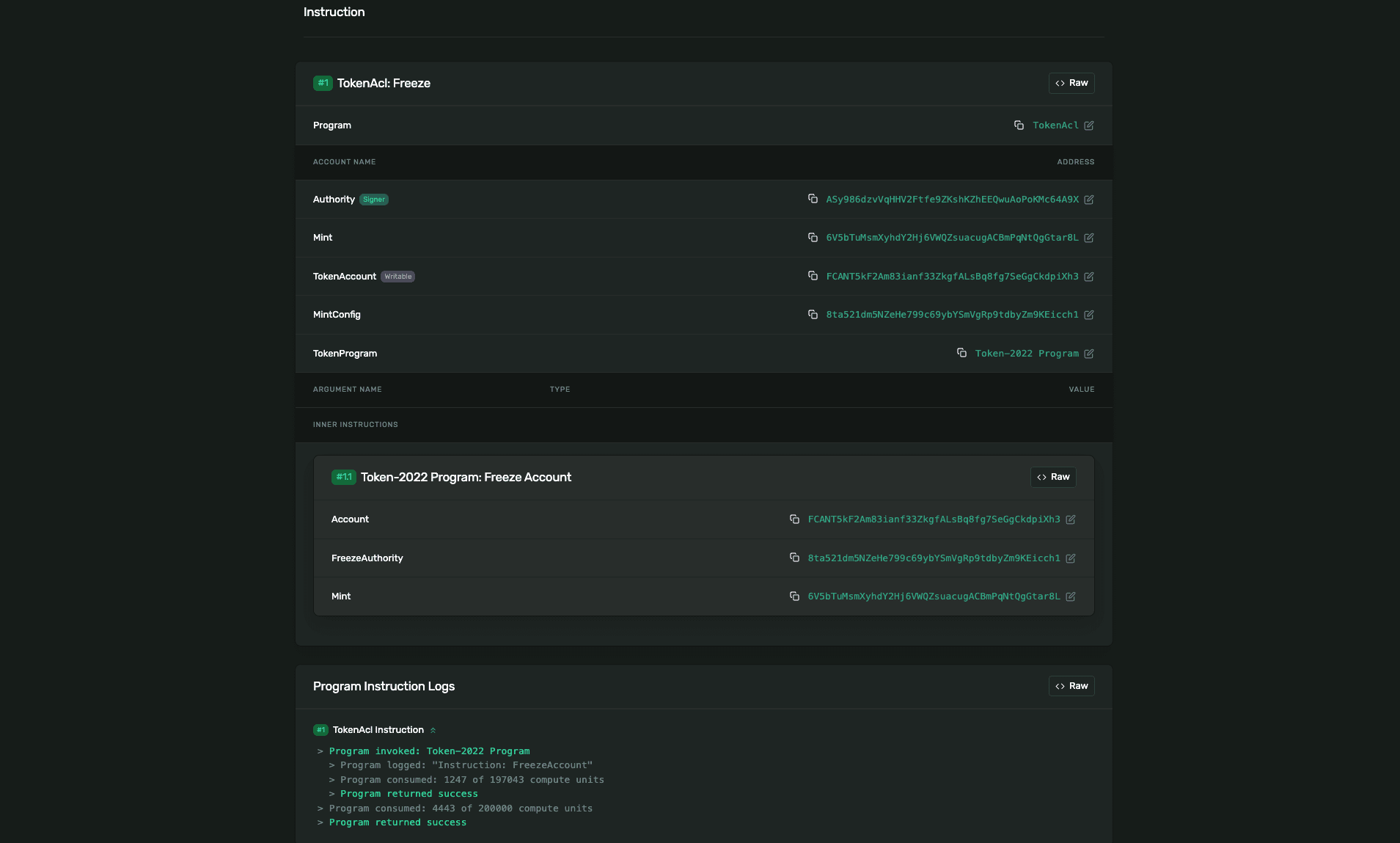
Freezing halts one holder's account without touching any other holder. The freeze is on-chain, enforced by the Token-2022 program. SDP signs the freeze instruction with the freeze authority that was set at deploy; the on-chain program does the enforcement.
const holderFreezeKey = idempotencyKey("freeze");
await sdpAdmin.post(
  `/v1/issuance/tokens/${tokenId}/freeze`,
  {
    signingCustodyWalletId,
    accountAddress: holderAddress,
    reason: "Court order #2026-IL-0142",
  },
  { idempotencyKey: holderFreezeKey }
);
You pass the holder's wallet address; SDP derives the Associated Token Account (the on-chain account that holds that holder's TPUSD balance) and freezes it. Once frozen, transfers to or from that account fail at the program level, not at SDP's gateway.
Section 7 demonstrates the resulting error: an HTTP 502 SOLANA_RPC_ERROR from SDP that wraps the Token-2022 program error custom program error: 0x11, which is the program's AccountFrozen signal. The compliance verdict is in the wrapped message; the outer SDP code is upstream-call diagnostic.
Seize for compliance recovery
Seize moves tokens out of a holder's account without their signature, via the permanent delegate authority set at deploy. The permanent delegate is a Token-2022 extension that grants a named authority the right to transfer or burn any holder's tokens regardless of holder signature. This is the technological capability the GENIUS Act requires you to have ready for lawful orders. The institutional use case is a court-ordered transfer or a sanctions matter where you must recover specific tokens to a controlled wallet.
const seizeKey = idempotencyKey("seize");
await sdpAdmin.post(
  `/v1/issuance/tokens/${tokenId}/seize`,
  {
    signingCustodyWalletId,
    seize: {
      source: holderAddress,
      destination: custodyAddress,
      amount: "50000.00",
      memo: "OFAC matter 2026-04-018",
    },
  },
  { idempotencyKey: seizeKey }
);
The memo persists on the transaction record. It's the audit attribution your compliance officer reads months later when she reconciles the action against the court order or sanctions notice that authorized it.
Force-burn as the final remedy
Force-burn destroys tokens at a holder's account. Same authority as seize, different effect. Reach for it only when the tokens cannot be recovered to a controlled wallet, for example a self-custodied address whose key you cannot obtain.
const forceBurnKey = idempotencyKey("force-burn");
await sdpAdmin.post(
  `/v1/issuance/tokens/${tokenId}/force-burn`,
  {
    signingCustodyWalletId,
    forceBurn: {
      source: holderAddress,
      amount: "12000.00",
      memo: "regulator-ordered burn 2026-04-021",
    },
  },
  { idempotencyKey: forceBurnKey }
);
The institutional pattern that holds this together
Every endpoint in this section requires the tokens:admin permission. That is by design. Keep two project-scoped API keys:
- Developer key: routine create, mint, and burn calls.
- Admin key: screen, freeze, seize, and force-burn.
The compliance officer reviewing this design sees a clean separation: routine issuance cannot escalate into compliance actions without a deliberate credential change. Every call writes an entry through SDP's audit service. That trail is the artifact a regulator will eventually ask for, and it is not opt-in.
6. Mint the first tokens
Minting is how new supply enters circulation. For a regulated stablecoin, every mint corresponds to a fiat reserve event: dollars arriving at the custody bank, attested by the reserve custodian, and recorded against an issuance ticket. The mint call is small. What you put in the memo field is what your compliance officer reconciles against the reserve report.
1. Send the mint call
Minting requires the tokens:write permission, so the Developer key (sdp) is the right credential:
const mintKey = idempotencyKey("mint");
const minted = await sdp.post(
  `/v1/issuance/tokens/${tokenId}/mint`,
  {
    signingCustodyWalletId,
    mint: {
      destination: custodyAddress,
      amount: "1000000",
      memo: "Reserve mint Q2-2026, reference: ANB-RESV-2026-04-091",
    },
  },
  { idempotencyKey: mintKey }
);
Four field rules to keep clear:
signingCustodyWalletIdis the exact SDP Walletidfrom Section 2. SDP verifies that this wallet controls the current mint authority; the historical deployment wallet is not used as a fallback.destinationis a Solana base58 address. For the initial issuer-holds-supply pattern, this is your custody wallet's public key. For subsequent mints to client wallets, it's the recipient's wallet.amountis a decimal string in UI units (post-decimals). Not a BigInt, not a number."1000000"mints one million TPUSD because the token has 6 decimals.memois up to 100 characters. SDP stores it on the transaction record. This is the institutional audit attribution: the reference your compliance officer will use months later when reconciling the mint against the reserve custodian's monthly report.
2. Read the response
A successful mint returns the transaction record and the token account that received the tokens:
{
  "data": {
    "transaction": {
      "id": "ttx_88240bf5-...",
      "type": "mint",
      "status": "confirmed",
      "signature": "51XZb4Tqm1G4LmSPUwnLrxENWmmhW9UE15LhxrwMrS6vKL4avFzKBBBcPNEQuiMEVgxWRgbdjJERo6K4taQEM9XG",
      "params": {
        "destination": "ASy986dzvVqHHV2Ftfe9ZKshKZhEEQwuAoPoKMc64A9X",
        "amount": "1000000",
        "memo": "Reserve mint Q2-2026, reference: ANB-RESV-2026-04-091",
        "tokenAccount": "NLcEWVJ8oiHdbf6xuSLSAfKfJ1Gqcw4ksYHnkCyEy3t"
      }
    },
    "tokenAccount": "NLcEWVJ8oiHdbf6xuSLSAfKfJ1Gqcw4ksYHnkCyEy3t"
  }
}
The tokenAccount is the Associated Token Account that holds the newly minted tokens. SDP creates it on first mint to that destination if it doesn't already exist; subsequent mints to the same destination reuse it.
3. The reserve attestation tie-in
The GENIUS Act requires a permitted payment stablecoin issuer to publish a monthly public attestation of reserve composition, signed by a registered public accounting firm, with separate CEO/CFO certification. The mint memo is what closes the loop on the engineering side of that obligation.
Every mint memo should carry, at minimum, a reserve reference number that maps to a specific reserve event in the custodian's records. Two minimum-viable patterns:
- Single-deposit mint:
"ANB-RESV-2026-04-091". The deposit reference the custody bank assigned when the fiat reserves were received. - Batched mint against a reserve commitment:
"Q2-2026 commitment tranche 3 of 6". A pre-arranged reserve commitment broken into scheduled releases.
The pattern that does not work is mint memos that don't reconcile cleanly to a reserve record. The compliance officer reading the attestation report needs a one-to-one mapping; the auditor signing the report depends on it.
4. Confirm the supply
const { data } = await sdp.get(`/v1/issuance/tokens/${tokenId}`);
console.log(`Total supply: ${data.token.totalSupply}`);
Prints:
Total supply: 1000000With tokens in circulation, Section 7 puts the compliance controls from Section 5 to a live test.
7. Test a transfer and a compliance action
Section 5's compliance controls only matter if they enforce. This section moves real tokens between two wallets, then puts the freeze authority to a live test. The block is enforced on-chain by Token-2022, not by SDP's gateway. That distinction is the institutionally important detail and the reason the error envelope reads the way it does.
1. The clean transfer
Transfers run on the /v1/payments/transfers endpoint family, separate from the issuance family that Section 4 used. The required permissions are payments:write and wallets:read, both of which the Developer key (sdp) carries:
const sourceCustodyWalletId = signingCustodyWalletId;

const screening = await sdpAdmin.post("/v1/compliance/address-screenings", {
  address: destinationAddress,
  network: "solana",
  intent: "transfer_destination",
});

for (const provider of screening.data.screening.providers) {
  if (provider.status === "error" || provider.riskScore > THRESHOLD) {
    throw new TransferBlocked(provider);
  }
}

const transfer = await sdp.post(
  "/v1/payments/transfers",
  {
    sourceCustodyWalletId,
    destination: destinationAddress,
    token: mintAddress,
    amount: "100",
    memo: "Treasury Pilot internal transfer #042",
  },
  { idempotencyKey: idempotencyKey("transfer") }
);
Three field rules to keep clear:
sourceCustodyWalletIdis the exact SDP Walletid(cwlt_*) returned byGET /v1/wallets. It is not the wallet's public key or provider-specificwalletId.tokenis the on-chain mint address you got from Section 4's deploy response. It is not the SDP token ID (tok_*).destinationis any valid Solana base58 address. It does not have to be a wallet SDP knows about.
A successful response includes the on-chain signature once the transaction confirms:
{
  "data": {
    "transfer": {
      "id": "xfr_f570debc-...",
      "type": "transfer",
      "direction": "outbound",
      "status": "confirmed",
      "custodyWalletId": "cwlt_123",
      "providerWalletId": "privy_jfxdbsq4bg6dxzsd7imgon3j",
      "signature": "ekNe4HK67AXptsx6krYATZd5xYeq8wYQShmN9oHUdAipVJVFELGwiLhdJNCAbyN2TPv9SwzBTNz6igoAfWTdCYP",
      "source": "ASy986dzvVqHHV2Ftfe9ZKshKZhEEQwuAoPoKMc64A9X",
      "destination": "2H2w3hSxAPTybuTL7LkhPbyk6bWYi94x2J4aqBhhyJL2",
      "token": "6V5bTuMsmXyhdY2Hj6VWQZsuacugACBmPqNtQgGtar8L",
      "amount": "100",
      "memo": "Treasury Pilot internal transfer #042"
    }
  }
}
2. Freeze the destination
To demonstrate the on-chain block, freeze the destination's TPUSD account using the Admin key. Freeze requires tokens:admin, which the Developer key does not carry:
const transferFreezeKey = idempotencyKey("freeze");
await sdpAdmin.post(
  `/v1/issuance/tokens/${tokenId}/freeze`,
  {
    signingCustodyWalletId,
    accountAddress: destinationAddress,
    reason: "Compliance hold pending OFAC review 2026-04-019",
  },
  { idempotencyKey: transferFreezeKey }
);
The freeze records a frozen account in SDP's audit trail and applies the Token-2022 freeze instruction to the destination's Associated Token Account on-chain. The on-chain side is verifiable on Solana Explorer:
3. Attempt the transfer again
Run the same transfer call. This time it fails:
try {
  await sdp.post(
    "/v1/payments/transfers",
    {
      sourceCustodyWalletId,
      destination: destinationAddress,
      token: mintAddress,
      amount: "100",
      memo: "Compliance test, expecting block",
    },
    { idempotencyKey: idempotencyKey("blocked-transfer") }
  );
} catch (error) {
  // handle the on-chain block (see step 4)
}
The error envelope SDP returns:
{
  "error": {
    "code": "SOLANA_RPC_ERROR",
    "message": "Failed to sign and send transaction: RPC Error -32000: Invalid transaction: Transaction simulation failed: Error processing Instruction 1: custom program error: 0x11"
  }
}
The outer error code is SOLANA_RPC_ERROR, but it is upstream-call diagnostic, not the compliance verdict. The actual reason lives in the wrapped message: custom program error: 0x11. That is Token-2022's AccountFrozen signal. The block was enforced on-chain by the program, not by SDP's gateway.
4. Parse the wrapped error
The institutional pattern is to write your error handler against the wrapped on-chain code rather than the outer SDP code. The outer code tells you something went wrong upstream; the wrapped code tells you what.
function isOnChainCompliance(error) {
  return error.message?.includes("custom program error: 0x11");
}

try {
  // transfer attempt
} catch (error) {
  if (isOnChainCompliance(error)) {
    // log to the compliance system, do not retry
    return reportToCompliance(error);
  }
  // anything else: treat as a transient RPC failure and apply your retry policy
  throw error;
}
Token-2022's 0x11 is AccountFrozen (decimal 17). Treat it as a compliance verdict, not a retry-able failure. The same pattern (outer code is the family of failure, wrapped code is the actual reason) applies whenever SDP wraps a downstream Solana RPC error.
5. Cleanup
For a production environment, unfreezing happens only after the underlying compliance review resolves. For sandbox testing, you can unfreeze immediately:
await sdpAdmin.post(`/v1/issuance/tokens/${tokenId}/unfreeze`, {
  signingCustodyWalletId,
  accountAddress: destinationAddress,
});
With the freeze cleared, the destination can receive transfers again. Section 8 covers the production transition: what changes between sk_test_ and sk_live_, and which checks your compliance officer signs against before this same code runs on mainnet.
8. Production transition checklist
The work between sk_test_ and sk_live_ is not a flag flip. It is the moment your compliance officer signs against the runbook your engineering team has been building since Section 2. Going to production means three things change mechanically and a longer list of things your institution attests to.
1. What changes mechanically
Your sandbox setup is built around six artifacts that all swap for production equivalents:
- API keys. Replace your project-scoped Developer and Admin keys with
sk_live_keys minted from your production project. Use the Section 2 bootstrap pattern with a fresh Admin key, selecting thedefault-productionproject fromGET /v1/projectsinstead ofdefault-sandbox, and fresh project-scoped keys minted under it. - Custody provider. Production reads
provideras your federally chartered custodian (Anchorage Digital Bank for most US institutional issuers), bound to your organization through the Anchorage onboarding flow. The Privy sandbox wallets do not carry over. - Solana network. Mainnet-beta replaces devnet. The custody address gets funded by your custody bank as part of standard operational support, not by a faucet.
- API base URL.
https://api.solana.comis the canonical production base. - Screening providers. Confirm the production provider mix matches your compliance team's policy. Run a
POST /v1/compliance/address-screeningsagainst a known address to verify each provider returnsstatus: "ok"before live traffic. - Idempotency-Key strategy. In production, generate idempotency keys deterministically per operation (for example,
mint-${reserveDepositReference}) rather than purely random per attempt. This lets your runbook resend safely without minting twice.
2. What your compliance officer signs off on
Before any sk_live_ key sees real traffic, the compliance officer needs evidence that the institutional posture from Section 1 is operational, not aspirational. The minimum sign-off list:
- GENIUS Section 4(a)(5) capabilities demonstrated. Screening, freeze, seize, and force-burn each exercised on sandbox with a captured response in the audit trail.
- BSA/AML program documented. Written risk-based policy with internal controls, ongoing customer due diligence, independent testing, and a US-located AML/CFT compliance officer named (proposed 31 CFR § 1033.210 under the FinCEN/OFAC implementing rules).
- Sanctions program ready. OFAC screening provider configured and tested, technical capability to block transactions in place, secondary-market screening procedure defined.
- Reserve attestation cadence agreed. Registered public accounting firm engaged, monthly examination schedule signed, CEO/CFO certification process defined.
- Audit trail review. SDP's audit-service entries reviewed for completeness; mint memos from Section 6 reconcile cleanly to reserve references in the custody bank's records.
- Incident response runbook. The operational playbook for a freeze, seize, or force-burn order. Court order arrives, who signs in to what credential, how long the chain of custody runs, where the documentation lands.
3. The cutover
When the sign-off is in, the cutover itself is small. Repeat the Section 2 bootstrap with environment: "production", mint your production keys, store them with your other live secrets, and update your runtime environment. Run the Section 2 wallet verification call against the production API base to confirm the wallets are bound. The first production mint corresponds to a real fiat reserve event at your custody bank.
9. What's next
You have a deployed regulated stablecoin, the compliance controls configured, and a production transition checklist your compliance officer can sign against. What you have built is the issuance side of the institutional product. Two adjacent tutorials carry forward from here.
Tokenize a Treasury Fund
The design and issuance pattern for a tokenized money market fund or treasury bond product under the tokenized-security template. Compliance posture differs from the stablecoin pattern in three ways: allowlist on by default, accounts open frozen, and an additional scaledUiAmount extension for accrued yield. Most of the Section 5 controls work identically; the differences sit in Sections 3 and 4.
Run Enterprise Stablecoin Payments
Picks up after Section 7. Covers transfer rails for institutional payment flows: bulk transfers, scheduled payments, on-ramp and off-ramp integration with custody bank settlement, and the policy-engine patterns that gate transfers at scale.
Reference docs
For deeper API surface beyond what this tutorial covers:
- SDP API reference. The generated endpoint inventory across all public API families.
- SDP Postman collection. Importable request bundle for the full API.
- Token-2022 program documentation. The on-chain program SDP wraps.
- GENIUS Act analysis. Statutory interpretation covering each subsection of the Act.
- FinCEN/OFAC implementing rules NPRM. The current implementing-rule source for the BSA designation in GENIUS Section 4(a)(5).