Tokenize a Treasury Fund
Build a regulated tokenized treasury fund on Solana with an SEC-registered transfer agent, qualified custodian, and monthly dividend distribution as the yield mechanic.
This tutorial walks you through tokenizing a treasury fund on Solana. The product you ship at the end is one a fund administrator can reconcile and a compliance officer can defend in product review. Issuing a regulated fund is not the same as deploying a token. It requires institutional infrastructure (transfer agent, qualified custodian, KYC-driven allowlist) wired into your token from create time.
Every code sample in this tutorial was exercised against SDP's sandbox during writing; the request and response shapes shown here are what the live API actually returned.
1. Why tokenizing a fund is different from issuing a stablecoin
You are at an asset manager building a regulated tokenized fund. The institutional pattern is BUIDL: BlackRock's USD Institutional Digital Liquidity Fund, a Section 3(c)(7) private fund offered under Reg D 506(c) to US qualified purchasers. The SEC Staff Statement on Tokenized Securities (January 28, 2026) anchors the regulatory reality: "securities, however represented, remain securities." This tutorial walks the BUIDL pattern on Solana.
Compared to a regulated stablecoin, three things invert.
Allowlist, not denylist. A stablecoin defaults to allow-by-default and screens out sanctioned addresses. A 3(c)(7) tokenized fund defaults to deny-by-default and admits only verified holders. Section 5 hinges on this inversion.
Transfer agent as external KYC owner. A stablecoin issuer runs compliance internally. A tokenized fund integrates with an SEC-registered digital transfer agent that owns the ownership ledger and runs KYC on prospective holders. Securitize is the dominant example. You own on-chain enforcement; the transfer agent owns eligibility.
Monthly dividend distribution via mint. A stablecoin keeps NAV at $1 and accrues nothing to holders. The BUIDL pattern accrues yield daily and distributes it monthly through mint events that drop new tokens to existing holders pro rata.
The two regulations operate on different investor standards:
| Regulation | Investor standard |
|---|---|
| Reg D 506(c) | Accredited investors |
| Section 3(c)(7) | Qualified purchasers (a stricter bar) |
Your allowlist verifies the qualified-purchaser threshold, which Section 8 walks through at production transition.
2. Prerequisites
Here's what you'll set up:
- An SDP account
- Project-scoped Developer and Admin keys
- A funded devnet custody wallet
- An API client wired up
- A separate test holder wallet
About thirty minutes from a cold start.
1. Sign up and provision custody
Sign up at platform.solana.com and create your organization. Wallet provisioning depends on your path.
Institutional (Anchorage relationship). Anchorage Digital Bank's onboarding team binds your signing wallets to the org.
Self-serve sandbox. SDP auto-provisions Privy wallets.
The API surface is identical; only the wallet record's provider field differs.
2. Mint two API keys
Every org auto-provisions a Default Sandbox Project at signup. Confirm it is current in the workspace switcher at the top-left of the dashboard, then mint two project-scoped keys from the API keys page: a Developer key for routine mint and dividend distribution, an Admin key for compliance operations (screening, freeze, seize, force-burn).
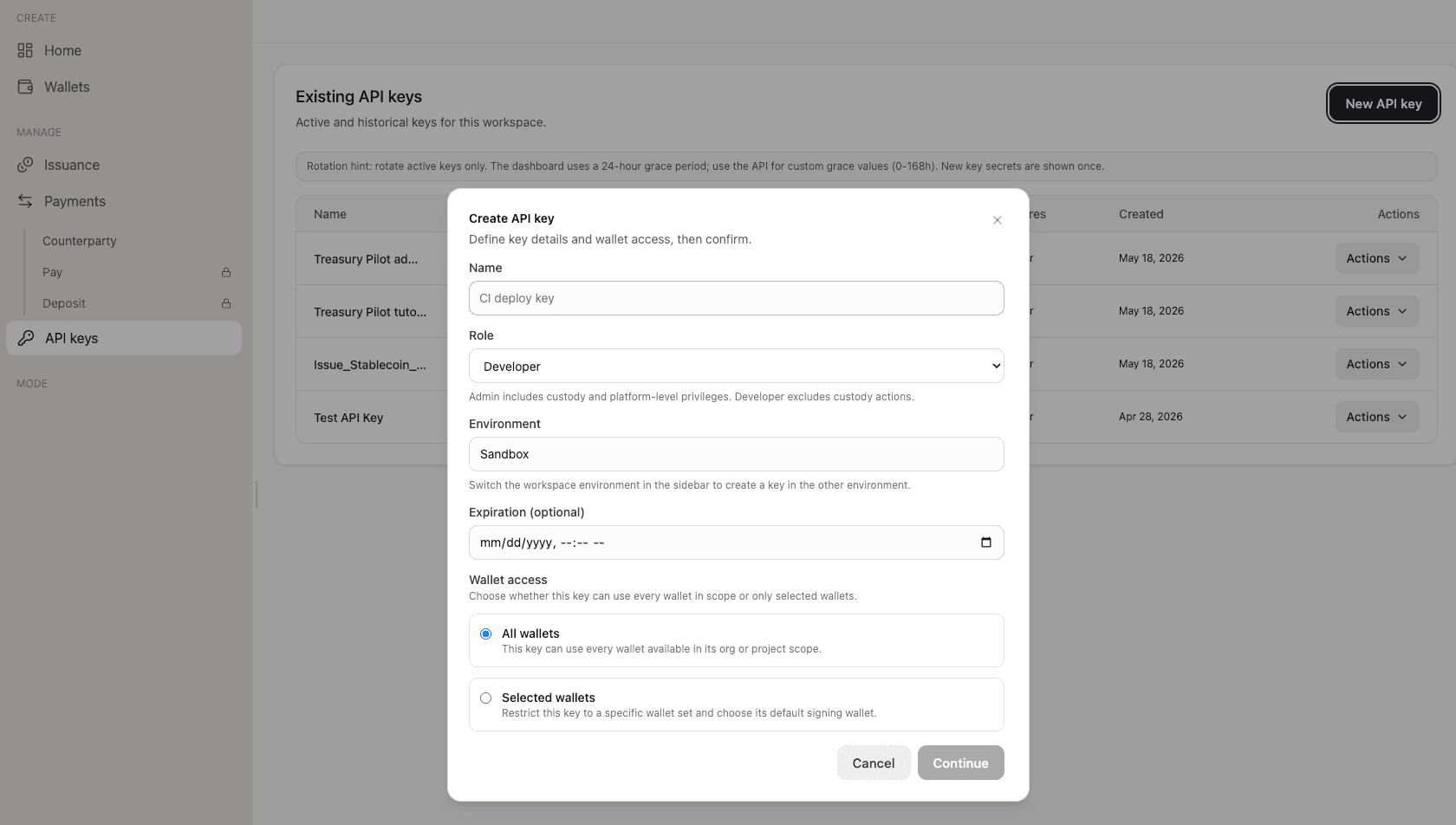
Capture both into your secrets manager. SDP does not surface either key again.
3. Fund the custody wallet
Hit faucet.solana.com on Devnet, paste the wallet's public key, request one SOL.
4. Wire the client and verify
Wire two HTTP clients (Developer + Admin) against https://api.solana.com with Bearer auth.
const BASE = "https://api.solana.com";

class SdpError extends Error {
  constructor({ code, message, status, response }) {
    super(`${code}: ${message}`);
    this.name = "SdpError";
    this.code = code;
    this.status = status;
    this.response = response;
  }
}

class SdpClient {
  constructor(apiKey, baseUrl = BASE) {
    this.apiKey = apiKey;
    this.baseUrl = baseUrl;
  }

  async request(method, path, body) {
    const res = await fetch(`${this.baseUrl}${path}`, {
      method,
      headers: {
        Authorization: `Bearer ${this.apiKey}`,
        "Content-Type": "application/json",
      },
      body: body ? JSON.stringify(body) : undefined,
    });
    const payload = await res.json();
    if (!res.ok) {
      throw new SdpError({
        code: payload?.error?.code ?? `HTTP_${res.status}`,
        message: payload?.error?.message ?? res.statusText,
        status: res.status,
        response: payload,
      });
    }
    return payload;
  }

  get(path) { return this.request("GET", path); }
  post(path, body) { return this.request("POST", path, body); }
}

const sdp = new SdpClient(process.env.SDP_API_KEY);
const sdpAdmin = new SdpClient(process.env.SDP_ADMIN_API_KEY);
Confirm the setup by listing wallets:
const { data } = await sdp.get("/v1/wallets");
console.log(`Custody wallets configured: ${data.wallets.length}`);
A working setup prints at least one wallet.
5. Generate a test holder wallet
Generate one Solana keypair locally and save its public key. Sections 5 through 7 will add this wallet to the allowlist, mint subscription tokens to it, and freeze its account for a compliance demo. In production this would be a holder's institutional wallet provisioned through your transfer agent's KYC pipeline.
3. Design the token
You choose a token template at the moment of creation. SDP's tokenized-security template is the BUIDL pattern translated into config: three required Token-2022 extensions and a deny-by-default state that come with the template, not with overrides you have to remember to set.
Permanent delegate. An institution-controlled authority that can move tokens out of any holder account without their signature. Section 5 invokes this for force-burn during wind-down or compliance seizure. It is the on-chain anchor for the transfer agent's authority over the ownership ledger.
Pausable. A market-wide stop on every transfer, mint, and burn at the token level. The happy path of this tutorial does not invoke pause; the design carries it because the template requires it and a regulated fund should not ship without it.
Scaled UI amount. A Token-2022 multiplier on display amounts. BUIDL maintains stable NAV at $1, so you set the multiplier to 1 and never change it. Yield distributes through new mints in Section 6, not through rebasing.
The template auto-sets two compliance defaults you do not pass in the body:
| Default | Behavior |
|---|---|
requiresAllowlist: true | Rejects every mint and transfer whose destination is not on your allowlist |
defaultAccountState: "frozen" | Configures every new holder ATA to open frozen at the SPL level |
Together they encode Section 3(c)(7) qualified-purchaser admission into the token's mainnet specification, not an application-layer policy a compliance officer has to discover from your code. On devnet, Mosaic deactivates the on-chain frozen-default mechanism so the reader can exercise the SDP allowlist pre-flight without on-chain friction; the pre-flight still returns HTTP 403 NOT_ON_TOKEN_ALLOWLIST for non-allowlisted destinations, and Section 5 elaborates the pre-flight gate.
SDP does not expose Token-2022 transfer hooks. The permanent-delegate + frozen-by-default pair covers the enforcement surface a hook would have given you. Holders must be on the allowlist before they can hold or receive tokens; Sections 5 and 8 walk the operator-approve pattern that enforces this. Tokens already in flight remain reachable by the delegate for compliance seizure.
Here is the create call:
const { data } = await sdp.post("/v1/issuance/tokens", {
  template: "tokenized-security",
  name: "Pilot Treasury Fund",
  symbol: "PTFND",
  description: "Pilot Section 3(c)(7) tokenized treasury fund.",
  maxSupply: "1000000000",
  isFreezable: true,
  isMintable: true,
  overrides: {
    extensions: {
      scaledUiAmount: { multiplier: 1 },
    },
  },
});

const token = data.token;
console.log(token.id, token.status);
Watch the body shape. Extension configs on token create go under overrides.extensions.<X>, not at the top level. The top-level form is silently dropped at create time. If a deployed token's extensions field is missing what you sent, that is the first place to check.
The response echoes the auto-set defaults so a design-time compliance review can confirm them:
{
  "data": {
    "token": {
      "id": "tok_...",
      "template": "tokenized-security",
      "decimals": 8,
      "requiresAllowlist": true,
      "extensions": {
        "defaultAccountState": "frozen",
        "scaledUiAmount": { "multiplier": 1 }
      },
      "status": "pending"
    }
  }
}
status: "pending" is the load-bearing field. You have a tokenized-security record. You do not yet have a deployed mint address. Section 4 walks the prepare/execute cycle that lands the on-chain artifact.
4. Deploy the token
You have a tok_* record with status: "pending". Deploy turns that record into a live on-chain mint: a Solana public key the transfer agent records on the ownership ledger, the freezeAuthority that gates your Section 5 compliance actions, and the mintAuthority that signs Section 6's subscription and dividend events. Two SDP calls do the work, with a diagnostic safety net before the irreversible one.
1. Extend the client for Idempotency-Key
Every state-mutating execute endpoint in SDP supports an Idempotency-Key HTTP header. SDP fingerprints each request as {operation, mode, tokenId, params} and uses the key + fingerprint to decide whether the request is a replay or a new one:
| Retry pattern | API treatment |
|---|---|
| Same key, same body | Replays the prior response |
| Different key, same body | New request (may produce a second on-chain transaction) |
| Same key, different body | New request (fingerprint mismatch, not a replay) |
The header is how you make network-level retries safe for irreversible operations like deploy, mint, burn, seize, and force-burn. Extend the SdpClient from Section 2 (keep the SdpError class declared there; only the SdpClient body changes):
import { randomUUID } from "node:crypto";

class SdpClient {
  constructor(apiKey, baseUrl = BASE) {
    this.apiKey = apiKey;
    this.baseUrl = baseUrl;
  }

  async request(method, path, body, { idempotencyKey } = {}) {
    const headers = {
      Authorization: `Bearer ${this.apiKey}`,
      "Content-Type": "application/json",
    };
    if (idempotencyKey) headers["Idempotency-Key"] = idempotencyKey;
    const res = await fetch(`${this.baseUrl}${path}`, {
      method,
      headers,
      body: body ? JSON.stringify(body) : undefined,
    });
    const payload = await res.json();
    if (!res.ok) {
      throw new SdpError({
        code: payload?.error?.code ?? `HTTP_${res.status}`,
        message: payload?.error?.message ?? res.statusText,
        status: res.status,
        response: payload,
      });
    }
    return payload;
  }

  get(path) { return this.request("GET", path); }
  post(path, body, opts) { return this.request("POST", path, body, opts); }
}

const idempotencyKey = (op) => `${op}-${randomUUID()}`;
Generate the key into a const once per operation, before the call. If a retry re-invokes the helper, you get a fresh UUID, which the API treats as a new request rather than a replay. The call sites in Section 4.3 onward follow this pattern.
2. Prepare the deploy as a diagnostic
Every execute endpoint with an irreversible side effect has a sibling /prepare endpoint that simulates the on-chain transaction without sending it. Prepare returns simulation.success, simulation.error, and simulation.logs: the human-readable Token-2022 program output a Solana node would emit. When execute returns an opaque 500, prepare with the same body surfaces the actual on-chain error in simulation.error and the failing instruction in simulation.logs. The pattern generalizes: every execute endpoint in SDP that has a /prepare sibling supports this diagnostic flow, and Sections 6 and 7 reuse it.
const tokenId = "<token id from Section 3>";

const prepared = await sdp.post(
  `/v1/issuance/tokens/${tokenId}/deploy/prepare`,
  {}
);

const { simulation } = prepared.data;
if (simulation.error) {
  console.error("Simulation failed:", simulation.error);
  simulation.logs.forEach(log => console.error("  " + log));
  process.exit(1);
}
console.log(`Simulation passed: ${simulation.unitsConsumed} CU`);
A clean simulation:
{
  "data": {
    "simulation": {
      "success": true,
      "unitsConsumed": "13896",
      "error": null,
      "logs": ["Program log: MetadataPointerInstruction::Initialize", "..."]
    }
  }
}
3. Execute the deploy
With prepare clean, the execute call is the actual on-chain transaction. Pass an Idempotency-Key so that if the network drops the response and you retry, you replay the original deploy result rather than producing a second on-chain transaction.
const deployKey = idempotencyKey("deploy");
const deployed = await sdp.post(
  `/v1/issuance/tokens/${tokenId}/deploy`,
  {},
  { idempotencyKey: deployKey }
);

const { token } = deployed.data;
console.log(token.mintAddress, token.status);
The response carries the four on-chain authorities and the live mint:
{
  "data": {
    "token": {
      "id": "tok_...",
      "status": "active",
      "mintAddress": "EJvtiAftkxzVBQLRhQoxhad85HNguSrG6Qd4mKEtxfvA",
      "mintAuthority": "ASy986...",
      "freezeAuthority": "ASy986...",
      "metadataAuthority": "ASy986...",
      "ablListAddress": null,
      "extensions": {
        "defaultAccountState": "frozen",
        "scaledUiAmount": { "multiplier": 1 },
        "permanentDelegate": "ASy986..."
      },
      "deployedAt": "2026-05-25T11:27:25.209Z"
    }
  }
}
4. Verify and hand off
The deploy response should match this shape:
| Field | Expected value |
|---|---|
status | "active" |
mintAddress | populated (Solana public key) |
mintAuthority | custody wallet |
freezeAuthority | custody wallet |
metadataAuthority | custody wallet |
extensions.permanentDelegate | custody wallet |
ablListAddress | null on devnet, populated on mainnet |
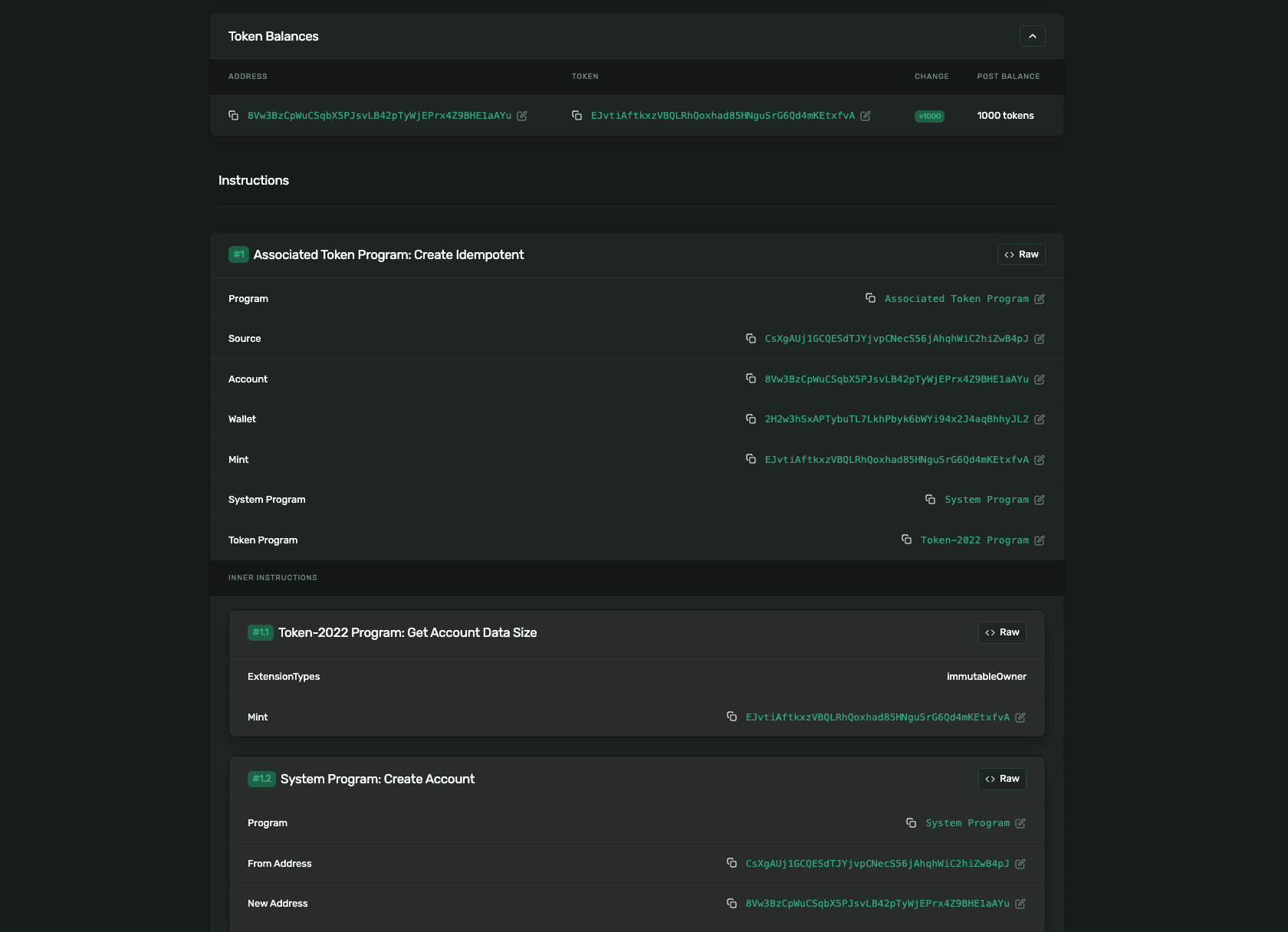
In SDP's default deploy, on-chain authority consolidates under the institution, and your separation of duties lives at the API key permission layer you set up in Section 2 (Developer vs Admin scopes) rather than at the protocol level. ablListAddress: null is expected on devnet, where Mosaic deactivates the on-chain ABL list per Section 3's note; mainnet deploys populate it.
Capture mintAddress into your records and share it with your transfer agent. It is the immutable on-chain identifier the agent will reference on every position statement issued against the fund.
Section 5 opens the allowlist. You have a deployed token but no eligible holders; the first task is admitting your verified holder wallet from Section 2 so subscription mints can land.
5. Configure compliance controls
The tokenized-security template gives you four operational levers:
- An allowlist that gates which addresses can hold the token.
- Address screening that flags risk on candidate holder addresses.
- Freeze that halts a single holder's account.
- Pause that halts every transfer on the token.
SDP enforces compliance in two layers.
Off-chain pre-flight runs in front of every state-mutating call. The destination-allowlist gate within the pre-flight rejects non-allowlisted addresses on devnet (and on any legacy token deployed without an on-chain ABL): minting returns HTTP 403 NOT_ON_TOKEN_ALLOWLIST before SDP signs anything.
On-chain enforcement runs on mainnet-beta. The on-chain ABL list activates alongside Token-2022's default-frozen account state. On mainnet, POST /mint auto-adds fresh destinations to the on-chain ABL list (and DB mirror) and only rejects destinations that have been explicitly revoked (HTTP 403 DESTINATION_REVOKED). The gate for who can hold the token shifts from the API to the issuer's operational discipline: call POST /allowlist before POST /mint for every holder, and revoke holders explicitly when they exit. Treat POST /mint to an unverified destination as a compliance error, not a typed-error case the API will catch. On devnet, the token deploys with ablListAddress: null and ATAs open initialized.
1. Manage the allowlist
The allowlist is your KYC'd cap table for this token. Your transfer agent feeds approved wallet addresses into it; you maintain the list on-chain.
await sdp.post(`/v1/issuance/tokens/${tokenId}/allowlist`, {
  address: holderAddress,
  label: "Institutional Holder A",
});
Add when the transfer agent confirms an investor's KYC and assigns a wallet address.
List to retrieve the current cap table.
Delete when an investor exits or is sanctioned. Deletion is revocation, not removal. The row stays on-chain with revokedAt populated.
Re-add when a previously revoked investor returns to good standing. The original entry id is reused with the original createdAt intact.
Compliance frameworks expect cap-table revocation, not destructive deletion. Use that framing in the compliance review.
2. Screen addresses before allowlisting
Your transfer agent runs the primary KYC pipeline. Your pre-allowlist screening is defense in depth, catching addresses the transfer agent's process might miss.
await sdp.post("/v1/compliance/address-screenings", {
  address: holderAddress,
  network: "solana",
  intent: "transfer_destination",
});
SDP screens against four providers in parallel: Range, Elliptic, TRM, and Chainalysis. Treat any provider returning status: "error" as a defense-in-depth gap, not a clean pass.
As of 2026-05-22, Chainalysis credentials are broken in production sandbox and the provider returns status: "error". Range, Elliptic, and TRM are the operational providers.
3. Handle compliance events
Freeze is the surgical lever. It halts on-chain operations against a single investor's token account. Use it for sanctioned holders, court-ordered holds, or short-term incident response.
await sdpAdmin.post(`/v1/issuance/tokens/${tokenId}/freeze`, {
  accountAddress: holderAddress,
  reason: "Court order 2026-CIV-1284 - account hold pending review",
});
SDP derives the holder's associated token account and freezes it on-chain. Refreezing the same account reactivates the same frz_* record. The audit trail shows one row per holder-ever-frozen, not one row per freeze event.
While frozen, no on-chain operation against the account succeeds. The holder cannot transfer. Your own mint flow, including the monthly dividend distribution from Section 6, fails. The error surface is inconsistent across endpoints.
POST /mintreturnsINTERNAL_ERROR, an opaque code that does not tell you the destination is frozen.POST /mint/prepareagainst the same body surfaces the underlying Token-2022 failure in its simulation output, the same diagnostic surface Section 4 established for opaque deploy failures.
Prepare-as-diagnostic is a standing pattern. When any execute endpoint returns an opaque error, call its prepare variant with the same body and read the simulation fields for the on-chain truth.
Pause is different from freeze. It halts every transfer on the token, not just one holder's account. Use it for incident response, regulator coordination, or scheduled maintenance.
Seize and force-burn are the escalation tier. They force-transfer or force-burn tokens through the permanent delegate authority, used only under court order. Both follow the Admin client pattern; the production runbook documents the worked example.
4. Configure authority and name the seam
Map the four on-chain authority roles to your org chart at deploy.
| Authority | Org owner |
|---|---|
mint | Treasury Operations |
freeze | Compliance Operations |
permanentDelegate | Compliance Operations |
metadata | Investor Relations |
The pausable extension's authority lives outside this enum and routes to your Incident Response team.
Update an authority with POST /v1/issuance/tokens/{tokenId}/authority. If a key is compromised, revoke the role permanently:
await sdpAdmin.post(`/v1/issuance/tokens/${tokenId}/authority`, {
  authority: { role: "mint", newAuthority: null },
});
Setting newAuthority: null permanently revokes the role. The on-chain operation it gated cannot be performed on this token again. There is no recovery path. This is what your compliance officer asks for when they raise key compromise scenarios.
Your transfer agent owns the KYC pipeline and the official record of ownership. Securitize is the dominant SEC-registered example for tokenized funds. You own the on-chain controls in this section. The two systems form one compliance perimeter for the regulator. Your runbook needs to make the boundary between them visible.
6. Mint subscription tokens and distribute monthly yield
You have an allowlisted holder with a zero balance. Two operations move them through the BUIDL lifecycle: a subscription mint when they wire fiat to your custody bank, and a monthly dividend mint when accrued yield distributes. Both go through the same SDP endpoint with different memos and amounts, and both become audit-grade transaction records your compliance officer can query.
1. Mint the subscription
When the holder's fiat lands in your custody bank, treasury operations computes the token quantity at the published NAV and mints to the holder's allowlisted address. SDP derives the holder's Associated Token Account (ATA) from the holder address and the mint, and deposits the new supply there. The memo field is optional in the API (max 256 chars) but it is the audit-trail anchor; always include one tied to your internal subscription identifier.
const subscriptionKey = idempotencyKey("mint-subscription");
const subscription = await sdp.post(
  `/v1/issuance/tokens/${tokenId}/mint`,
  {
    mint: {
      destination: holderAddress,
      amount: "1000.00",
      memo: "Subscription #001 - institutional holder initial purchase",
    },
  },
  { idempotencyKey: subscriptionKey }
);

const { transaction, tokenAccount } = subscription.data;
console.log(transaction.id, transaction.status, tokenAccount);
The response carries the transaction record and the ATA address:
{
  "data": {
    "transaction": {
      "id": "ttx_6c203ee1-eb7b-4c6b-a914-993482934ef0",
      "type": "mint",
      "status": "confirmed",
      "signature": "3uQngWB7Zqxr...",
      "params": {
        "destination": "2H2w3hSxAP...",
        "amount": "1000.00",
        "memo": "Subscription #001 - institutional holder initial purchase"
      }
    },
    "tokenAccount": "8Vw3BzCpWuCSqbX5PJsvLB42pTyWjEPrx4Z9BHE1aAYu"
  }
}
Capture tokenAccount (the ATA) into your records. It's the on-chain account Section 7's compliance demo freezes, derived by SDP from the holder's wallet address.
The mint endpoint assumes the holder is already on the allowlist from Section 5. On mainnet, an unverified destination would be auto-added to the allowlist by the mint call itself, silently undoing the qualified-purchaser gate the fund's compliance perimeter depends on. Always call POST /allowlist ahead of POST /mint and gate the workflow so the order can't be inverted.
2. Distribute the monthly dividend
Yield accrues daily off-chain in your treasury accounting system. Monthly distribution happens on-chain as a mint to each existing holder for their pro rata share. BUIDL maintains stable NAV at $1, so dividends do not change the scaledUiAmount multiplier; they add new tokens to existing holders. SDP does not support post-deploy scaledUiAmount updates, which is why this pattern uses mint events rather than rebasing.
For a holder with a 1000 PTFND subscription and a published rate of 4.5% APY:
// Compute in integer cents and basis points — float math on money
// (e.g. 1000 * 0.045 / 12) accumulates rounding artifacts.
const holderCents = 1000 * 100;
const monthlyYieldCents = Math.floor((holderCents * 450) / 10_000 / 12); // 450 bps = 4.5% APY
const monthlyYield = (monthlyYieldCents / 100).toFixed(2); // "3.75"

const dividendKey = idempotencyKey("mint-dividend");
const dividend = await sdp.post(
  `/v1/issuance/tokens/${tokenId}/mint`,
  {
    mint: {
      destination: holderAddress,
      amount: monthlyYield,
      memo: "Dividend distribution - July 2026 - holder #001 - 4.5% APY accrual",
    },
  },
  { idempotencyKey: dividendKey }
);
SDP derives the same ATA as the subscription mint and deposits the dividend there. The holder's balance is now 1003.75. The transaction record carries the period-tagged memo, ready for the compliance officer to query.
The pro rata calculation runs in treasury operations. SDP mints the calculated amount. Do not push calculation logic into the issuance layer.
3. Verify the audit trail
Pull the transactions history to confirm both records landed with their memos. The endpoint is paginated; a complete audit-trail fetch iterates until meta.hasMore is false.
async function fetchAllTransactions(tokenId) {
  const all = [];
  let page = 1;
  while (true) {
    const { data, meta } = await sdp.get(
      `/v1/issuance/tokens/${tokenId}/transactions?page=${page}&pageSize=100`
    );
    all.push(...data);
    if (!meta.hasMore) break;
    page += 1;
  }
  return all;
}

const transactions = await fetchAllTransactions(tokenId);
console.log(`Records: ${transactions.length}`);
transactions.forEach(tx => console.log(`  ${tx.type.padEnd(8)} ${tx.params.amount ?? "-"}  ${tx.params.memo ?? ""}`));
Each response page is shaped { data: [...], meta: { total, page, pageSize, hasMore, requestId } }. The accumulated list contains every state-changing transaction this token has produced: mint, burn, freeze, seize, force-burn, unfreeze. Each record carries its memo verbatim, the on-chain signature, the destination address, the amount, and the createdAt timestamp. This is the artifact your compliance officer reads.
Section 7 walks the compliance demo that exercises the failure surface: subscription mints succeed, the holder gets flagged by your screening provider, you freeze the holder's account, and the next mint attempt returns an opaque 500 that prepare-as-diagnostic resolves.
7. Test a subscription and a compliance action
You have a holder with 1003.75 PTFND from Section 6. Now exercise the failure surface end-to-end: freeze the holder's account, attempt the next dividend mint and watch SDP return an opaque 500, call prepare-as-diagnostic to surface the actual Token-2022 error, then unfreeze and confirm the mint resumes. This is the dress rehearsal your compliance officer wants to see before a real freeze event.
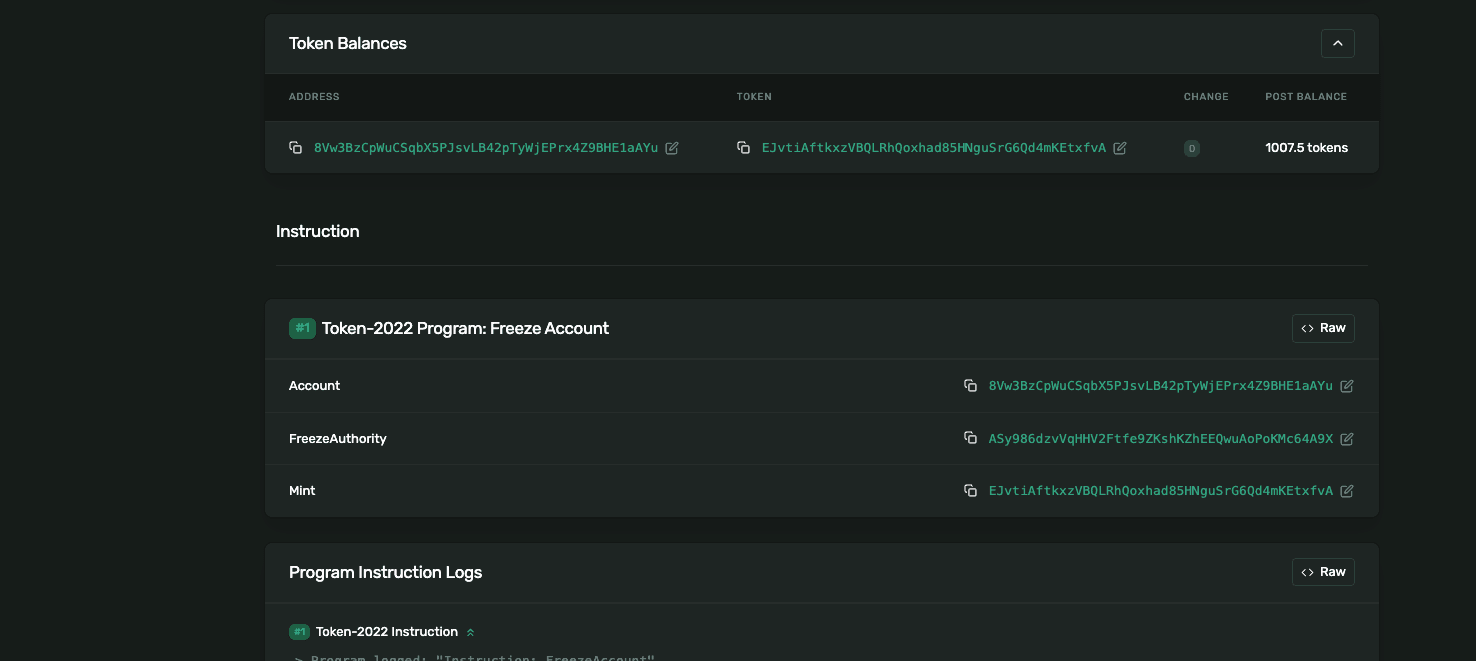
1. Freeze the holder's account
A compliance event has occurred: the screening provider flags the holder, the transfer agent requests a hold, or a court order arrives. The Admin client issues the freeze. SDP derives the holder's ATA from the wallet address you pass in and freezes it at the Token-2022 layer.
const frozen = await sdpAdmin.post(
  `/v1/issuance/tokens/${tokenId}/freeze`,
  {
    accountAddress: holderAddress,
    reason: "Court order 2026-CIV-1284 - account hold pending review",
  }
);

const { frozenAccount } = frozen.data;
console.log(frozenAccount.id, frozenAccount.accountAddress, frozenAccount.signature);
The reason field is your audit anchor. Tie it to a legal or operational identifier (court order, OFAC SDN match, internal incident ticket) so the compliance officer can trace each freeze back to its basis. The response carries the frz_* id and the derived ATA address:
{
  "data": {
    "frozenAccount": {
      "id": "frz_024308c1-...",
      "accountAddress": "8Vw3BzCpWuCSqbX5PJsvLB42pTyWjEPrx4Z9BHE1aAYu",
      "reason": "Court order 2026-CIV-1284 - account hold pending review",
      "frozenAt": "2026-05-25T13:00:17.000Z",
      "signature": "FeWG4XgNTh..."
    }
  }
}
The same frz_* id is reused if you refreeze later; SDP tracks one record per holder-ever-frozen, with the latest reason and timestamp. The audit trail is one row per holder, not one row per freeze event.
2. Attempt the dividend mint and observe the opaque 500
Try to deliver the next monthly dividend. With the ATA frozen, the mint should not land. Use the same sdp.post shape from Section 6.
const blockedMintKey = idempotencyKey("mint-blocked");
try {
  await sdp.post(
    `/v1/issuance/tokens/${tokenId}/mint`,
    {
      mint: {
        destination: holderAddress,
        amount: "3.75",
        memo: "Dividend distribution - August 2026 - holder #001",
      },
    },
    { idempotencyKey: blockedMintKey }
  );
} catch (err) {
  console.error(err.status, err.code, err.message);
}
The response is HTTP 500 with error.code: "INTERNAL_ERROR" and error.message: "An internal error occurred". No on-chain reason. No frozen-account flag. If you stopped here, your runbook would have nothing to escalate with.
3. Diagnose with prepare
Call /mint/prepare with the same body. Prepare simulates the transaction without executing and returns the on-chain reason the execute call hid.
const diagnosis = await sdp.post(
  `/v1/issuance/tokens/${tokenId}/mint/prepare`,
  {
    mint: {
      destination: holderAddress,
      amount: "3.75",
      memo: "Diagnostic prepare against frozen ATA",
    },
  }
);

const { simulation } = diagnosis.data;
console.log(simulation.success, simulation.error);
simulation.logs.forEach(log => console.log("  " + log));
The diagnostic response carries everything execute swallowed:
{
  "data": {
    "simulation": {
      "success": false,
      "error": "{\"InstructionError\":[\"1\",{\"Custom\":\"17\"}]}",
      "logs": [
        "Program log: Instruction: MintTo",
        "Program log: Error: Account is frozen",
        "Program TokenzQdBNbLqP5VEhdkAS6EPFLC1PHnBqCXEpPxuEb failed: custom program error: 0x11"
      ]
    }
  }
}
Decoding: InstructionError is Solana's wrapper around a program failure; index 1 names which instruction in the transaction failed; Custom: 17 is the program's own error code. Hex 0x11 = decimal 17 = Token-2022's AccountFrozen. The simulation.logs carry the verbatim program log line that confirms the same thing in English.
This is the runbook step. When execute returns opaque, call its prepare sibling with the same body. Read simulation.error for the wire-level reason and simulation.logs for the human-readable one.
4. Unfreeze and resume
The compliance event is resolved. Issue the unfreeze and retry the mint.
const unfrozen = await sdpAdmin.post(
  `/v1/issuance/tokens/${tokenId}/unfreeze`,
  { accountAddress: holderAddress }
);

console.log(unfrozen.data.frozenAccount.unfrozenAt);

const resumeKey = idempotencyKey("mint-dividend-aug");
const resumed = await sdp.post(
  `/v1/issuance/tokens/${tokenId}/mint`,
  {
    mint: {
      destination: holderAddress,
      amount: "3.75",
      memo: "Dividend distribution - August 2026 - holder #001",
    },
  },
  { idempotencyKey: resumeKey }
);

console.log(resumed.data.transaction.status);
The unfreeze response shows the same frz_* id with unfrozenAt and unfrozenBy populated. The retry mint lands with transaction.status: "confirmed". The hold is reversible, and the audit trail records both the freeze and the unfreeze, with the legal basis from your reason field preserved on the freeze record.
You have exercised the compliance failure surface end-to-end. Section 8 walks the cutover from sandbox to production: switching to sk_live_ keys, the Default Production Project, on-chain ABL list activation that devnet stubbed out, and the custody binding to Anchorage.
8. Production transition checklist
The cutover from sandbox to production is not a configuration flip. The first mainnet mint is a real subscription event: fiat reserves bind to on-chain supply, the transfer agent's KYC record becomes part of the public ledger, and the audit trail becomes regulator-facing. This section walks the discrete steps that get you to that moment.
1. Switch projects, mint production keys
Every organization auto-provisions a Default Production Project at signup. Switch to it in the workspace switcher at the top-left of the dashboard, mint two project-scoped keys from the API keys page (a Developer key for routine subscription and dividend distribution, an Admin key for compliance operations), and update your runtime environment to load the new keys. The sk_live_ prefix is derived from the project's environment, not configured directly. The canonical SDP_API_BASE remains https://api.solana.com; only the key values change.
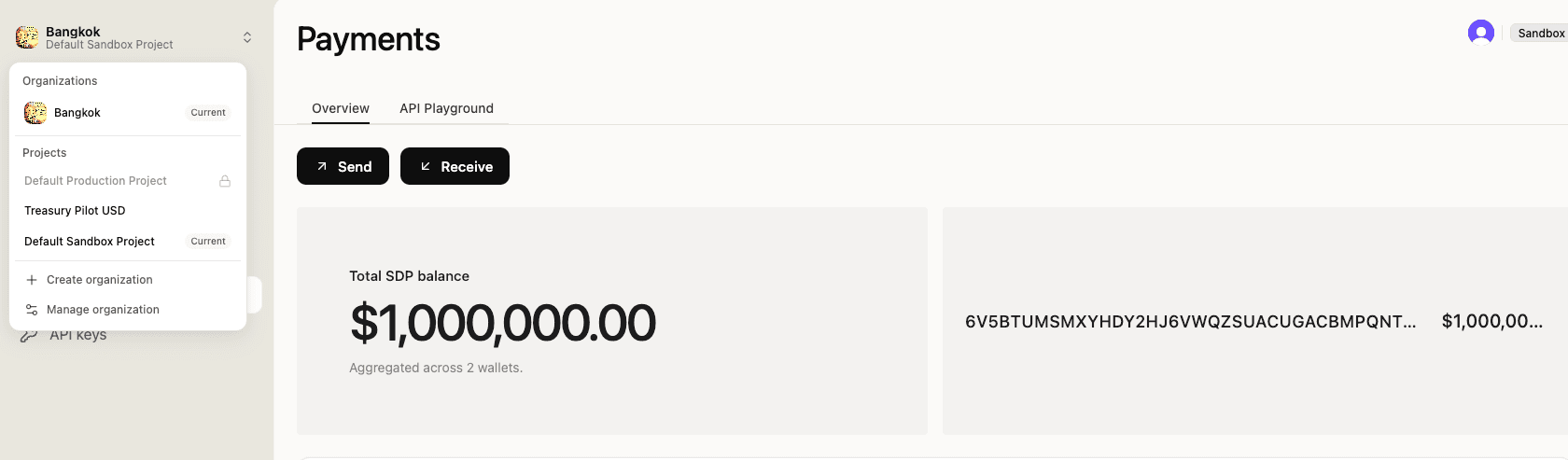
Confirm the cutover with the wallet listing call from Section 2 against the production base. The custody binding from your institutional onboarding (Anchorage Digital Bank for institutional pipelines, Fireblocks or a contracted alternative for other regimes) surfaces as the wallet record's provider field.
2. Know what changes on mainnet
The SDP API surface is identical between sandbox and production. What changes is the on-chain enforcement layer that devnet stubbed out for testability:
| Behavior | Devnet (sandbox) | Mainnet (production) |
|---|---|---|
defaultAccountState on the deployed mint | initialized (Mosaic deactivated) | frozen (template-default activated) |
ablListAddress on the deployed token | null | populated (on-chain allowlist active) |
| Non-allowlisted mint enforcement | Off-chain pre-flight rejects with HTTP 403 NOT_ON_TOKEN_ALLOWLIST | POST /mint auto-adds fresh destinations to the allowlist; only revoked destinations rejected with HTTP 403 DESTINATION_REVOKED. Issuer's runbook must call POST /allowlist before POST /mint to keep the operator-approve gate. |
| API key prefix | sk_test_ | sk_live_ |
| Custody binding | Sandbox provisioning | Production custody binding |
| First mint consequence | Sandbox state mutation | Real fiat reserve event |
Mainnet behaves differently from the sandbox you rehearsed against. The off-chain pre-flight gate that catches non-allowlisted destinations on devnet is bypassed for mint on mainnet; the on-chain auto-add described above takes its place. Your POST /allowlist-before-POST /mint workflow becomes the operative gate, and the pre-mint checklist below enforces it.
3. Run the pre-mint readiness checklist
The first mainnet mint should not happen until each of these is true.
- Reserves landed. Fiat subscription has reconciled in the custody bank against the transfer agent's record.
- Allowlist seeded. Holder wallet is on the production allowlist, sourced from the transfer agent's verified qualified-purchaser list. No sandbox test addresses present.
- Real memo. The mint memo references the actual subscription identifier from the transfer agent's records, not a tutorial placeholder.
- Admin key separated. The Admin key sits with compliance operations, not the developer team. The runbook names who can issue a freeze, under what circumstances, with what
reason-field discipline. - Screening fresh. The address screening providers (Range, Elliptic, TRM) returned a clean result on the holder address within the freshness window your compliance policy defines.
- Reporting cadence wired. Whatever cadence your compliance officer specifies (driven by 33/40 Act and Reg D 506(c) obligations, not GENIUS Act stablecoin rules) is in your treasury operations runbook.
When the checklist is green, run the subscription mint against the production base. The transaction record carries the same shape as sandbox; the difference is that the on-chain supply now corresponds to a real fund unit.
Section 9 names what comes after the cutover: ongoing audit cadence, operational runbook patterns, and adjacent SDP work worth tracking.
9. What's next
You have a live mainnet token, a real first subscription, and a rehearsed compliance runbook. The work this tutorial does not cover lives in three places.
The audit cadence is yours to define. Your compliance officer, transfer agent, and auditor specify the reconciliation rhythm, the attestation publishing schedule, and how dividend mints feed into the 1099 or K-1 issuance pipeline. The SDP transactions endpoint is one input; the cadence and reporting boundaries sit outside SDP.
Adjacent SDP work extends this pattern. The Issue a Regulated Stablecoin tutorial walks the GENIUS-compliant digital dollar version of the institutional issuer story. The Run Enterprise Stablecoin Payments tutorial extends the same SDP primitives into ramps, counterparty management, and payment flows. Both share the API surface you wired in Section 2.
One structural gap to know about. SDP has no API path to update a deployed token's scaledUiAmount multiplier post-deploy. The BUIDL pattern in this tutorial sidesteps the gap by distributing yield through mint events. If your fund design later requires continuous-NAV via multiplier changes, raise it with the SDP team; the SDP changelog is the source of truth for what's shipped.